Hexo安装笔记

Hexo-NEXT常用操作命令

部署命令行

1
hexo clean && hexo g && hexo d

写作

1
hexo new “title”

标签

1
2
3
4
5
---
title: 多线程 — GCD
date: 2016-06-14
tags: OC //标签
---

文章内添加图片

  1. 把图片放到 source/_posts/自定义文件夹/image.png
  2. 文章中插入图片
1
![image](自定义文件夹/image.png)

设置头像

  1. 把图片放入 themes/next/source/images
  2. 修改头像
1
2
3
4
# Sidebar Avatar
# in theme directory(source/images): /images/avatar.jpg
# in site directory(source/uploads): /uploads/avatar.jpg
avatar: http://example.com/avatar.png

本地头像

1
avatar: /images/avatar.gif

Ps:图片格式我用.jpeg时加载不出了,改成.gif可以正常显示

Hexo 安装手记

  • 2018/08/08

一、安装 Node.js

下载Node.js

二、安装HEXO

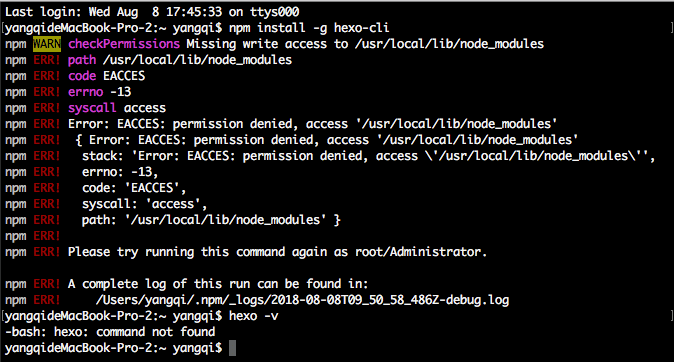
执行命令行,报错

1
npm install -g hexo-cli

Hexo安装笔记01

改用👇,成功

1
sudo npm install -g hexo

三、初始化HEXO

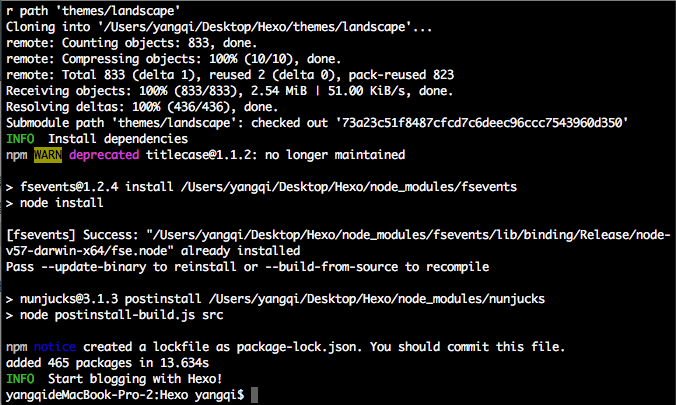
cd 所在文件夹,执行命令👇,初始化

1
hexo init

Hexo安装笔记02

Permission denied (publickey). 问题解决:

1
2
3
4
git config --global user.email “yagnqi_office@163.com”
git config --global user.name “KevinYangGit”
ssh-keygen -t rsa -C "yangqi_office@163.com"

更新 github 里的 SSH

四、安装插件

执行👇,安装插件

1
npm install hexo-deployer-git --save

五、常用复合命令

1
2
3
// (第一次要输入用户名和密码)
hexo deploy -g
hexo server -g

简写:

hexo n == hexo new
hexo g == hexo generate
hexo s == hexo server
hexo d == hexo deploy

Hexo常见问题解决方案

[[http://wp.huangshiyang.com/hexo%E5%B8%B8%E8%A7%81%E9%97%AE%E9%A2%98%E8%A7%A3%E5%86%B3%E6%96%B9%E6%A1%88]]

[[https://cnodejs.org/topic/5502652573263b0e4eef9b26]]

[[http://stackoverflow.com/questions/9484829/npm-cant-find-package-json]]

[[http://www.jianshu.com/p/98e993305653]]

博客样式

[[https://github.com/hexojs/hexo/wiki/Themes]]

[[https://github.com/daisygao/hexo-themes-cover]]

[[https://github.com/A-limon/pacman]]

[[https://github.com/TryGhost/Casper]]

[[https://github.com/huangjunhui/concise.git]]